Smart Pocket Interface Guide (Wallet Edition)
JAPANDAOSolution
Smart Pocket Magazine
Hello everyone!
In the previous article, we introduced the core feature MemePad, explaining how to issue tokens, purchase and manage them, and how the reward system works.
This time, we’ll take a closer look at another key feature — Points.
The Smart Pocket point system consists mainly of the following three features:
The points you earn determine your rank (C → B → A → S) — and the higher your rank, the greater your chances of receiving airdrop rewards.
The operation is very simple and can be completed in just a few steps.
(Example: HOLY → SP)

① Tap Point, and select the token you want to swap from. (If it’s already displayed, skip this step.)
② From the token list, select HOLY token.
③ Confirm your selection.

④ Tap the field for the token you want to swap to.
⑤ From the list, select SP token.
⑥ Confirm your selection.

⑦ Enter the amount you want to swap in the input field (or you can select a percentage of your total token balance).
⑧ Select the transaction multiplier:
.x1 Swap: Swap the amount you entered
.x10 Swap: Swap 10× the amount you entered
.Max: Swap your entire token balance
After setting it, tap Swap Now.
(A small transaction fee will be charged, so make sure you have enough funds prepared in advance.)
⑨ On the confirmation screen, check the swap amount and details. If everything looks correct, tap Confirm.
⑩ The swap is now complete.

To perform a reverse SWAP
Simply tap the center arrow button to reverse the swap direction.
If the token you want to swap doesn’t appear in the list, follow these steps:

① Tap Point → Swap, then select the field for “Token to swap to.”
② Enter a keyword in the search field.
③ Type the name of the token (e.g., enter “Holy” and select Holy Coin).
④ After entering the swap amount and selecting the transaction multiplier(x1 Swap, x10 Swap, or Max) as described above, simply tap “Swap Now” at the end to complete the swap.

① Tap MemePad from the bottom menu → select the Official Token or Verify tab at the top.
② Enter the token page and tap Swap.
③ After entering the swap amount and selecting the transaction multiplier(x1 Swap, x10 Swap, or Max), tap “Swap Now” to complete the swap.

You can also swap popular or well-known tokens by selecting Hot → Dex or Highest Market Cap → Dex from the menu. (Tap More View to see additional tokens.)
You can also earn points by swapping between tokens (for example: swapping SOL for another token).
Therefore, it’s recommended to deposit SOL into your Phantom wallet first, and use the SWAP feature to exchange it for tokens you are familiar with and regularly use.
This allows for safer, simpler swaps — and helps you efficiently accumulate points and climb the ranks.
Always use official tokens (such as HOLY, PKM, SP, AMATO, etc.).
Tokens with an orange verification checkmark next to their names are officially verified and display accurate quantities and prices.
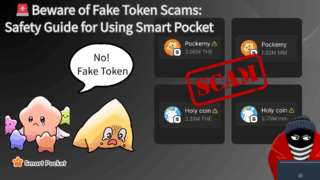
⚠️ Tokens that show a warning icon or have unnatural price values may be scam tokens, so never swap them.

For more information on how to protect yourself from fake token scams, please refer to the following article:
⚠️ Important Notes
Completing tasks is also very simple.

① Tap Point → Task, then tap the Start button next to each task.
② Perform the instructed action (e.g., like, repost, read news, etc.).
③ After completing, press the Claim button.
④ You will earn 1 PT per task completed.
※ If the Start button doesn’t change to Claim, try repeating the task a few times.
Depending on the situation, there are several types of tasks:

If you can’t return to Smart Pocket from the task page:

① Add the top page to your bookmarks.
② After completing the task, tap the URL bar if the page freezes.
③ Press the “×” button to close it.
④ Reopen Smart Pocket from your bookmark.
By using the INVITE (Referral) feature, you can invite your friends to Smart Pocket by sharing your invite code / invite link.
If your friend makes SWAP transactions in the Smart Pocket App and their total transaction amount reaches the required threshold, you (the referrer) may receive point (PT) rewards.
Follow the steps below to copy your invite code or invite link:

① Tap Point in the bottom menu
② Tap Invite at the top
③ Copy your invite code or invite link
Tip: Sharing the invite link directly with your friends is the easiest and most intuitive way.
After your friend receives your invite code, they can complete the input and linking process using either of the following methods:

Method 1: Enter it after logging in (Pop-up)
Method 2: Enter it from the Home screen
⚠️ Notes
After your friend enters your invite code, only the SWAP transactions made afterward will be counted toward the total. Once the total transaction amount reaches the required threshold, you can claim the corresponding point (PT) rewards from the Invite page.

① Check whether the requirements have been met
.Tap Point in the bottom menu
.If a notification dot appears on the top-right of Invite, it means there are referral rewards available to claim
.Tap Invite to enter the page
.In Qualified Invites, you can see how many of your referrals are considered valid and eligible
② Claim your points
.Scroll down and tap Claim under the section that has met the requirements
③ Claim complete
.Once a success message appears, your points have been claimed successfully
Additional Info: What are Qualified Invites?
Qualified Invites refers to valid referrals where the invited friend has actually made transactions and met the required conditions.
In other words, entering the invite code alone is not enough—it will only be counted when your friend actively participates and completes the required transactions.
In this article, we provided a detailed explanation of Smart Pocket’s Point feature.
By using both SWAP (earn points through trading) and TASK (daily missions), you can efficiently accumulate PT.
The Smart Pocket team will continue to expand features and improve the system to enhance the overall value of the ecosystem.
For long-term holders and active users, this system is not just about rewards — it’s a mechanism for growing and creating value together.

-3.png)