AirDrop Quest Complete Guide — Earn Points and Receive Tokens
JAPANDAOSolution
Smart Pocket Magazine
In the previous article, we briefly introduced some of the features available on the personal page. In this article, we will explain in more detail the personal page sections that were not covered previously. We will also provide a brief introduction to the wallet feature and the gacha feature. In addition, we will introduce the newly launched Discord community.
If you have not yet read the previous article, we recommend starting with Part 1 before continuing with this guide.
In the previous article, we briefly introduced the invitation system. Specifically, we explained how to invite friends and how users can earn additional point rewards when the number of successful invitations reaches certain milestones.
In this update, a new feature called the Referral Chain Bonus has been added. When users you invited complete tasks on the platform and earn points, 5% of the points they earn will automatically be added to your account as bonus points.
In addition, there is no limit to the number of people you can invite. Therefore, by inviting more friends, you can continue to receive additional bonus points over time.

When users you invited continue to complete tasks and earn points, the system will automatically calculate and accumulate a 5% referral chain bonus from those points.
In this section, you can also check the total referral reward points accumulated so far.
In the Social section of the profile page, users can view friend information, manage friend relationships, and interact with other users. This feature adds a community interaction element to the platform, rather than functioning only as a task-based system.
This feature differs from the referral system. The referral system is mainly used to invite friends who have not yet joined the Airdrop Quest platform using a referral code, or whose referral code has not yet been used. In contrast, the Social feature is designed for users who have already joined the Airdrop Quest platform to interact and engage with one another.
As a result, the method of counting friends and the way points are earned differ between these two features.
On the Social page, you can find the “Invite friends & earn bonus points” section.

① Users can invite friends using the following methods:
When a friend adds you through your invitation link, both users will receive +10 Bond Points. Please note that the reward can be earned for up to 5 friends per day.
② If another user sends you a friend request (a notification will appear), it will be displayed as “friend request(s) pending” on your profile page.
You can then choose to Accept or Ignore the request.
In the Friends List, users can interact with others through various interaction icons, enabling social engagement within the platform. One example is the following feature:
❤️ Cheer
Users can send a Cheer to their friends as a form of encouragement.

🎁 Gift
Users can send their points to friends as a gift. The steps are as follows:

①Click the gift icon.
②Select the number of points to send to your friend (5 pt, 10 pt, 20 pt, 50 pt).
You can also add a short message (this can be left blank).
Click “Send Gift” to complete the process.
Please note that you can send gifts up to 3 times per day.
Friend Sorting Method
Depending on the selected category, the display order of friends will be arranged according to the corresponding criteria.

If you want to add new friends, you can use the Search Users feature.

By using this search feature, you can quickly find friends and expand your connections within the community.
On the Social page, various records and statistical information are displayed to help users understand the overall community interaction and their interaction history with friends.
● Gift Interaction History
In the Gift Interaction section, related records are displayed based on the following categories:


In the information area at the top of the profile page, you can quickly view statistics related to current social interactions at a glance.
The main items displayed are as follows:
In addition, the official post also introduced the feature with the following message:
“Something amazing is happening. People from all over the world are now sending support to each other in real time.”
“10,000 interactions achieved. But the real goal is bigger.”
On the profile page, you can view your SOL Wallet Address and manage the wallet information connected to the platform.
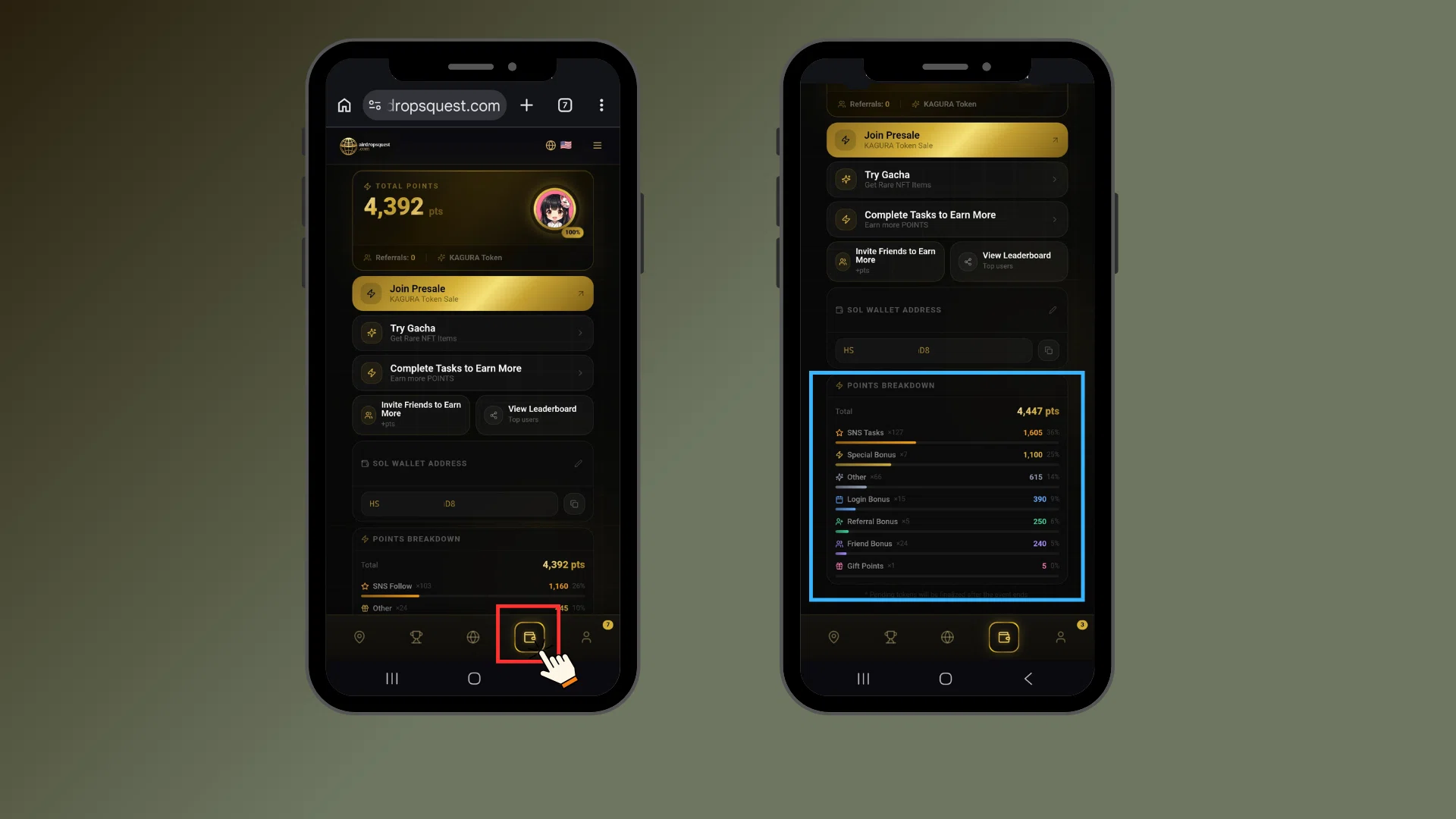
In the Wallet section, users can mainly perform the following actions:
This feature will be used for future airdrops and related event distributions, so it is recommended to verify in advance that your wallet address is correctly registered.
The platform also provides a Gacha feature, allowing users to use their points to participate in a draw and obtain additional point rewards.

Click “Wallet” in the bottom menu, then select “Draw Gacha.”
Each reward has a different rarity level, and the reward pool includes the following:
Draw results are recorded in Spin History, where users can review their past draw records.
Through this Gacha feature, users have another opportunity to obtain additional points through luck, in addition to completing tasks.
When participating in Airdrop Quest, the most important thing is to follow the platform’s rules and guidelines.
To ensure the activities proceed smoothly and to avoid any violations, all users are strongly recommended to carefully review the rules before participating in tasks.
You can check the World Rules by following the steps below:

To strengthen interaction and information sharing within the community, the official Discord community has also been established.
On Discord, users can:
Important announcements and the latest updates may be shared more quickly through the Discord community.
Therefore, users participating in Airdrop Quest are encouraged to join in order to stay informed with the latest information as early as possible.
In this article, we continued from the previous guide and provided a more detailed introduction to the platform’s latest updated features. The main topics covered include the Referral Chain Bonus in the invitation system, the Social feature, the Wallet function, the Gacha system, World Rules, and how to join the Discord community.
With these new features and improvements, users can not only earn points by completing tasks, but also enhance their overall experience through community interactions, the friend system, and various event mechanisms, making participation more engaging and interactive.
The platform is still undergoing continuous feature additions and optimizations, and some new functions have not yet been covered in this article. These will be introduced gradually in future articles. To stay updated with the latest information and events, please continue to follow the official announcements.